C Internals
contents
- getting started with CPython source code
- the walrus operator
- string optimization
- chained comparison operators
- integer optimization
- how Python's id() works
- adding a new statement to Python
- function overloading in Python
- parser and tokenization
- visualizing abstract syntax trees
- pointers in Python
- the print function internals
- Python is slow as hell
- python execution process
- the GIL
- references
"To appreciate C one must learn assembly; to appreciate Python one must learn C. They all stack on top of each other (Assembly -> C -> Python -> English (now))"
Python has many implementations (PyPy, Jython, etc.), but the original and most popular is CPython.
getting started with CPython source code
Clone it:
$ git clone https://github.com/python/cpython
$ cd cpython
$ git checkout v3.8.0b4  # or whatever version you prefer
What's inside:
cpython/
│
├── Doc      ← Source for the documentation
├── Grammar  ← The computer-readable language definition
├── Include  ← The C header files
├── Lib      ← Standard library modules written in Python
├── Mac      ← macOS support files
├── Misc     ← Miscellaneous files
├── Modules  ← Standard Library Modules written in C
├── Objects  ← Core types and the object model
├── Parser   ← The Python parser source code
├── PC       ← Windows build support files
├── PCbuild  ← Windows build support files for older Windows versions
├── Programs ← Source code for the python executable and other binaries
├── Python   ← The CPython interpreter source code
└── Tools    ← Standalone tools useful for building or extending Python
After forking and cloning, I broke things down into:
- Finding the entry point (the main function) of Python
- Locating where specific functions are implemented
- Editing those functions
- Remaking grammar files/source files and running the modified Python
the walrus operator
Python 3.8 added the Walrus Operator (:=). It assigns and returns in one shot.
Say you're building a tiny shell that takes commands until you type exit:
Without walrus:
command = input("$ ")
while command != "exit":
    os.system(command)
    command = input("$ ")
With walrus:
while (command := input("$ ")) != "exit":
    os.system(command)
one thing which is weird about the walrus operator
>>> a := 10
  File "<stdin>", line 1
    a := 10
      ^
SyntaxError: invalid syntax
That fails. But wrap it in parentheses and it's fine:
>>> (a := 10)
10
This is documented in wtf-python. Python disallows non-parenthesized assignment expressions but allows non-parenthesized assignment statements. Annoying.
modifying Python's grammar
But we can fix that. Modify the grammar:
# Add walrus operator here so we don't need () every time
expr_stmt: testlist_star_expr (annassign | augassign (yield_expr|testlist) |
                   [('=' (yield_expr|testlist_star_expr))+ [TYPE_COMMENT]] |
                   [(':=' (yield_expr|testlist_star_expr))+ [TYPE_COMMENT]]
                   )
The compiler doesn't read the grammar file. It reads a parser table that pgen generates from it. So after changing the grammar, you run make regen-pgen and make to rebuild. Now it works:
>>> a := 10
>>> a
10
string optimization
Python does something clever with strings called String Interning:
>>> a = 'samit'
>>> b = 'samit'
>>> a == b
True
>>> id(a)
4337581920  # memory location
>>> id(b)
4337581920  # same memory location
Both variables point to the same memory location.
string interning
The idea is simple: don't create a new copy of a string every time. Keep one copy of each distinct string and use pointer references everywhere else.
You can check if two objects are the same in-memory object with is:
>>> 'python' is 'python'
True
how does it work
PyUnicode_InternInPlace does the interning:
void PyUnicode_InternInPlace(PyObject **p)
{
    PyObject *s = *p;
    PyObject *t;
    // Check if already cached, return that
    if (PyUnicode_CHECK_INTERNED(s))
        return;
    if (interned == NULL) {
        interned = PyDict_New();  // create global mapping like a cache
        if (interned == NULL) {
            PyErr_Clear();
            return;
        }
    }
    // STRING INTERNING KEY -> we aren't really storing strings but rather pointers
    t = PyDict_SetDefault(interned, s, s);
    if (t == NULL) {
        PyErr_Clear();
        return;
    }

    if (t != s) {
        Py_INCREF(t);  // increases reference (more objects pointing to it)
        Py_SETREF(*p, t);  // sets *p = t so new p string points to instance of t
        return;
    }
    Py_REFCNT(s) -= 2;
    _PyUnicode_STATE(s).interned = SSTATE_INTERNED_MORTAL;
}
I added a print statement to the C code and you can watch interning happen:
>>> a = 'samit'
Already interned: __doc__
Already interned: __annotations__
Already interned: top
Interning: <module>
Interning: samit
Already interned: stderr
Already interned: flush
Already interned: flush
Already interned: stdout

>>> b = 'samit'
Already interned: samit  # already interned
chained comparison operators
Python lets you chain comparisons. a < b < c means (a < b) and (b < c). Like how math notation works.
>>> -3 < -2 < -1
True
>>> 3 > 2 == 1
False
In C, the same expressions give opposite results:
#include <stdio.h>

int main(int argc, char *argv[]) {
    printf("%d\n", -3 < -2 < -1);
    printf("%d\n", 3 > 2 == 1);
    return 0;
}

// Output:
// 0  // false
// 1  // true
C evaluates -3 < -2 < -1 as ((-3 < -2) < -1) because of left-to-right associativity.
how Python implements comparison chaining
Looking at the bytecode with dis:
dis.dis("1 < 2 < 3")
  0           RESUME                   0

  1           LOAD_CONST               0 (1)
              LOAD_CONST               1 (2)
              SWAP                     2
              COPY                     2
              COMPARE_OP               2 (<)
              COPY                     1
              TO_BOOL
              POP_JUMP_IF_FALSE        5 (to L1)
              POP_TOP
              LOAD_CONST               2 (3)
              COMPARE_OP               2 (<)
              RETURN_VALUE
      L1:     SWAP                     2
              POP_TOP
              RETURN_VALUE
Python short-circuits here: once it knows 1 < 2, it checks 2 < 3. C would evaluate (1 < 2) < 3, which compares 1 to 3.
integer optimization
Python preallocates integers from -5 to 256. Any time you use a number in that range, you get the same object back instead of a new one.
>>> x, y = 36, 36
>>> id(x) == id(y)
True

>>> x, y = 257, 257
>>> id(x) == id(y)
False
get_small_int returns the preallocated integers:
static PyObject *
get_small_int(sdigit ival)
{
    PyObject *v;
    assert(-NSMALLNEGINTS <= ival && ival < NSMALLPOSINTS);  // NSMALLNEGINTS = 5, NSMALLPOSINTS = 257
    v = (PyObject *)&small_ints[ival + NSMALLNEGINTS];
    Py_INCREF(v);
    return v;  // return the preallocated integer instance
}
peephole optimizations
CPython also does "peephole optimizations" which lead to some weird behavior:
>>> x = 1000
>>> y = 1000
>>> x is y
False  # In REPL

# But in a file this would return True
CPython preloads:
- Integers between
-5and256 - Strings under 20 characters that only contain ASCII letters, digits, and underscores
>>> s1 = "realpython"
>>> s2 = "realpython"
>>> s1 is s2
True

>>> s1 = "Real Python!"  # Contains non-alphanumeric characters
>>> s2 = "Real Python!"
>>> s1 is s2
False
how Python's id() works
id() returns the memory address of an object. builtin_id in bltinmodule.c implements it:
static PyObject *
builtin_id(PyModuleDef *self, PyObject *v)
{
    PyObject *id = PyLong_FromVoidPtr(v);  // stores argument as a memory location in id

    if (id && PySys_Audit("builtins.id", "O", id) < 0) {
        Py_DECREF(id);
        return NULL;
    }

    return id;
}
PyLong_FromVoidPtr(v) converts a pointer to a Python long integer:
PyLong_FromVoidPtr(void *p)
{
    return PyLong_FromUnsignedLong((unsigned long)(uintptr_t)p);
}
the 'is' operator
is checks if two references point to the same object:
>>> a = 10
>>> b = 10
>>> a is b
True
>>> id(a)
4343226816
>>> id(b)
4343226816
In bytecode it's the IS_OP instruction:
>>> import dis
>>> dis.dis("a is b")
  0           RESUME                   0

  1           LOAD_NAME                0 (a)
              LOAD_NAME                1 (b)
              IS_OP                    0
              RETURN_VALUE
ceval.c implements IS_OP:
case TARGET(IS_OP): {
    PyObject *right = POP();
    PyObject *left = TOP();

    // Check if two pointers are the same
    int res = Py_Is(left, right) ^ oparg;

    // Set the result on top of stack
    PyObject *b = res ? Py_True : Py_False;
    Py_INCREF(b);
    SET_TOP(b);
    Py_DECREF(left);
    Py_DECREF(right);
    DISPATCH();
}
oparg is how it handles both is and is not:
>>> dis.dis("a is not b")
  0           RESUME                   0

  1           LOAD_NAME                0 (a)
              LOAD_NAME                1 (b)
              IS_OP                    1
              RETURN_VALUE
adding a new statement to Python
Python's main function looks different depending on your OS:
/* Minimal main program -- everything is loaded from the library */

#include "Python.h"

#ifdef MS_WINDOWS
int
wmain(int argc, wchar_t **argv)
{
    return Py_Main(argc, argv);
}
#else
int
main(int argc, char **argv)
{
    return Py_BytesMain(argc, argv);
}
#endif
I added a new statement called nuke that just kills the runtime with exit code 45:
    | 'break' { _PyAST_Break(EXTRA) }
    | 'continue' { _PyAST_Continue(EXTRA) }
    | 'nuke' { _PyAST_nuke(EXTRA) }
// in python.gram

// in compile.c

    case Break_kind:
        return compiler_break(c);
    case Continue_kind:
        return compiler_continue(c);
    case Nuke_kind:
        return compiler_nuke(c);

static int
compiler_nuke(struct compiler *c)
{
    exit(45);  // implementation
}
Python 3.10+ uses pegen; earlier versions used pgen. Run make regen-pegen then make, and we've got a new keyword:
>>> nuke
[Program exits with code 45]
function overloading in Python
Python doesn't do function overloading like C++:
// C++ supports function overloading (C does not)
int area(int len, int breadth) { return len * breadth; }
float area(int radius) { return 3.14 * radius * radius; }

// area(3,4) calls the first function, area(3) calls the second
In Python, defining a function with the same name overwrites the previous one:
def area(length, breadth): return length * breadth
locals()
# {'area': <function area at 0x104d1b420>}

def area(radius):
    return radius * radius * 3.14
locals()
# {'area': <function area at 0x104d1b2e0>}

print(area(4))  # 50.24
print(area(3,4))  # TypeError: area() takes 1 positional argument but 2 were given
implementing function overloading
You can fake it with decorators though:
from inspect import getfullargspec
from functools import wraps

class OverloadRegistry:
    """ Singleton class to hold overloaded functions """
    _instance = None  # private
    def __init__(self) -> None:
        if OverloadRegistry._instance is not None: raise Exception("Use get_instance() to get singleton instance")
        self.registry = {}
        OverloadRegistry._instance = self

    @classmethod
    def get_instance(cls):
        if cls._instance is None: cls._instance = OverloadRegistry()
        return cls._instance

    def _make_key(self, fn, args=None):
        if args is None: args = getfullargspec(fn).args
        return (fn.__module__, fn.__name__, len(args))  # key = {module, name, number of arguments}

    def register(self, fn):
        key = self._make_key(fn)
        self.registry[key] = fn  # attach this key to function

        @wraps(fn)
        def wrapper(*args, **kwargs):
            """ The @wraps decorator preserves metadata of the original function """
            match_key = (fn.__module__, fn.__name__, len(args))
            target_fn = self.registry.get(match_key)
            if not target_fn: raise TypeError("No matching function of this type")
            return target_fn(*args, **kwargs)
        return wrapper

def overload(fn):
    return OverloadRegistry.get_instance().register(fn)

@overload
def area(l, b): return l * b

@overload
def area(r): return r * r * 3.14

print(area(5,6))  # 30
print(area(3))    # 28.26
Python 3.4+ also has functools.singledispatch which dispatches based on type:
from functools import singledispatch

@singledispatch
def area(shape):
    raise TypeError("Unsupported type")

@area.register
def _(dimensions: tuple):
    l, b = dimensions
    return l * b

@area.register
def _(radius: int):
    return 3.14 * radius * radius

print(area((5,6)))  # 30
print(area(3))      # 28.26
And 3.8+ has singledispatchmethod for class methods:
from functools import singledispatchmethod
class AreaCalc:
    @singledispatchmethod
    def area(self, shape):
        raise TypeError("Unsupported Type")

    @area.register
    def _(self, dimensions: tuple):
        l, b = dimensions
        return l * b

    @area.register
    def _(self, radius: int):
        return 3.14 * radius * radius

calc = AreaCalc()
print(calc.area((5,6)))  # 30
print(calc.area(3))      # 28.26
parser and tokenization
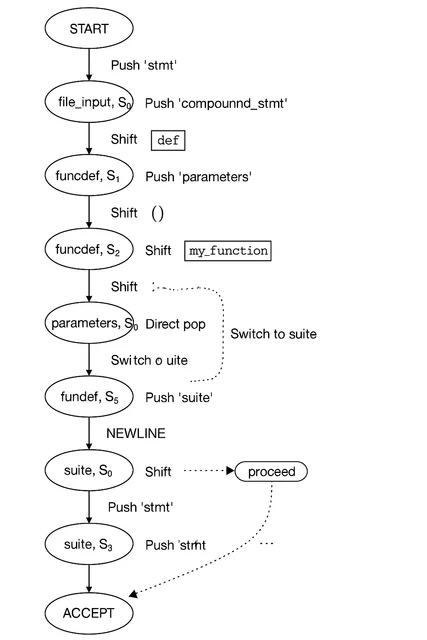
Python's old pgen parser (Python 3.9 and earlier) uses Deterministic Finite Automata (DFA) to process tokens. The -d flag shows the DFA states for each token:
$ ./python.exe -d test_tokens.py

Token NAME/'def' ... It's a keyword
 DFA 'file_input', state 0: Push 'stmt'
 DFA 'stmt', state 0: Push 'compound_stmt'
 DFA 'compound_stmt', state 0: Push 'funcdef'
 DFA 'funcdef', state 0: Shift.
Token NAME/'my_function' ... It's a token we know
 DFA 'funcdef', state 1: Shift.
Token LPAR/'(' ... It's a token we know
...
DFA visualization:
visualizing abstract syntax trees
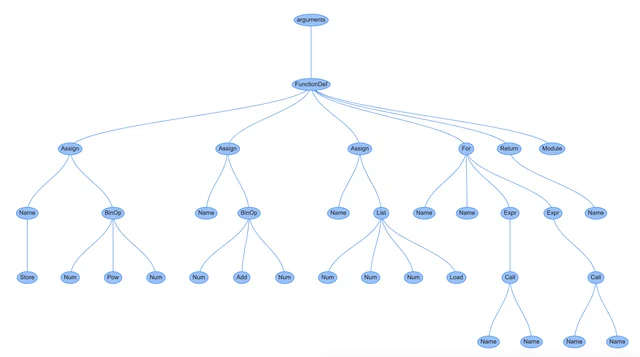
CPython converts your code into an Abstract Syntax Tree (AST). You can visualize this with instaviz:
import instaviz

def main():
    a = 2 * 2 * 2 * 2
    b = 1 + 5
    c = [1, 4, 6]
    for i in c:
        print(i)
    else:
        print(a)
    return c

instaviz.show(main)
The AST shows the loop and its else branch:
The compiler then turns this AST into bytecode:
- Create a control flow graph (CFG) representing execution order
- Convert CFG nodes into bytecode
pointers in Python
Python doesn't expose pointers to you, but they're everywhere in CPython's internals. Every Python object is a PyObject* in C, a pointer to a struct with a reference count and a type pointer. When you do a = b in Python, you're copying a pointer, not the object.
Py_INCREF bumps the reference count for each new reference. Py_DECREF drops it, and frees the object when it hits zero. You saw this already in the string interning code above. That Py_INCREF(t) and Py_SETREF(*p, t) pair is the same reference-count bookkeeping that assignment does. del x can leave the object in memory. Py_DECREF frees it only at zero, and something else may still hold a reference.
the print function internals
Here's print() in CPython:
static PyObject *
builtin_print(PyObject *self, PyObject *const *args, Py_ssize_t nargs, PyObject *kwnames)
{
    // If no file specified, use stdout
    if (file == NULL || file == Py_None) {
        file = _PySys_GetObjectId(&PyId_stdout);
        // ...
    }

    // Print each argument with separator
    for (i = 0; i < nargs; i++) {
        if (i > 0) {
            if (sep == NULL)
                err = PyFile_WriteString(" ", file);
            else
                err = PyFile_WriteObject(sep, file, Py_PRINT_RAW);
            if (err)
                return NULL;
        }
        err = PyFile_WriteObject(args[i], file, Py_PRINT_RAW);
        if (err)
            return NULL;
    }

    // Print end character (default: newline)
    if (end == NULL)
        err = PyFile_WriteString("\n", file);
    else
        err = PyFile_WriteObject(end, file, Py_PRINT_RAW);

    Py_RETURN_NONE;
}
So when you call print("hello world!"):
"hello world!"becomes aPyUnicodeObjectbuiltin_print()runs with 1 argumentbuiltin_print()setsfiletostdout- It writes the argument to
file - It writes a
\ntofile
Python is slow as hell
I wrote the same binary search tree (BST) in both Python and C++ to compare:
"""
BST Structure
     5
    / \
   3   7
  /     \
 1       9
"""

import time
import random
class Node:
    def __init__(self, data) -> None:
        self.left = None
        self.right = None
        self.data = data

class BST:
    def __init__(self) -> None:
        self.root = None

    def insert(self, data):
        if self.root is None: self.root = Node(data)
        else:
            self._insert(data, self.root)

    def _insert(self, data, currNode):
        if data < currNode.data:
            # left tree
            if currNode.left is None: currNode.left = Node(data)
            else:
                self._insert(data, currNode.left)
        elif data > currNode.data:
            if currNode.right is None: currNode.right = Node(data)
            else:
                self._insert(data, currNode.right)
        else:
            print("Value already in tree")

def inorder(node): # L N R
    if node:
        inorder(node.left)
        print(node.data)
        inorder(node.right)


def run_python_benchmark():
    nums = random.sample(range(1, 100000), 10000)  # 10,000 unique numbers
    tree = BST()
    start = time.time()
    for num in nums:
        tree.insert(num)
    end = time.time()
    print(f"Python BST insert time: {end - start:.6f} seconds")

run_python_benchmark()#include <iostream>
#include <chrono>
#include <vector>
#include <algorithm>
#include <random>
using namespace std;
using namespace std::chrono;
class Node
{
public:
int data;
Node *left;
Node *right;
Node(int val)
{
data = val;
left = right = nullptr;
}
};
class BST
{
public:
Node *root;
BST()
{
root = nullptr;
}
void insert(int data)
{
if (!root)
root = new Node(data);
else
insertHelper(data, root);
}
private:
void insertHelper(int data, Node *currNode)
{
if (data < currNode->data)
{
if (!currNode->left)
currNode->left = new Node(data);
else
insertHelper(data, currNode->left);
}
else if (data > currNode->data)
{
if (!currNode->right)
currNode->right = new Node(data);
else
insertHelper(data, currNode->right);
}
}
};
int main()
{
vector<int> nums(10000);
iota(nums.begin(), nums.end(), 1);
shuffle(nums.begin(), nums.end(), mt19937(random_device{}()));
BST tree;
auto start = high_resolution_clock::now();
for (int n : nums)
tree.insert(n);
auto end = high_resolution_clock::now();
duration<double> elapsed = end - start;
cout << "C++ BST insert time: " << elapsed.count() << " seconds" << endl;
return 0;
}performance comparison
| Language | Average Time (per run) |
|---|---|
| Python | 14.52 milliseconds |
| C++ | 2.22 milliseconds |
C++ is approximately 6.5x faster in this case.
python execution process
Why is Python slow? Because it interprets bytecode at runtime instead of compiling straight to machine code like C/C++.
What happens when you run a Python script:
- The compiler reads your
.pysource - The compiler converts the source to bytecode and writes a
.pycfile - The Python Virtual Machine (PVM) interprets that bytecode
- The PVM runs each bytecode instruction with compiled C code
- The CPU runs that C code
These steps take a long time..
the GIL
We saw Py_INCREF and Py_DECREF back in the pointers section. Every Python object carries a reference count and every assignment bumps it. That refcount is the reason CPython can't run two threads of Python at once.
If two threads incremented the same object's refcount at the same moment, their increments could interleave and lose an update. Each increment has three steps: read the count, add one, write it back. You leak an object, or worse, free one that's still in use. CPython's fix is simple: a single global mutex, the GIL (Global Interpreter Lock). A thread must hold it to execute bytecode. Only one thread runs bytecode at a time, so refcount updates can't race.
This is also why x += 1 isn't atomic across threads. It compiles to separate load, add, and store bytecodes, and the interpreter can switch threads between any of them:
>>> import dis
>>> dis.dis("x += 1")
  1           LOAD_NAME                0 (x)
              LOAD_CONST               0 (1)
              BINARY_OP               13 (+=)
              STORE_NAME               0 (x)
The trade:
- CPU-bound threads don't speed up. Four threads doing math share one GIL, so they take turns. Use
multiprocessinginstead. Each process has its own interpreter and its own GIL. - I/O-bound threads do speed up. A thread releases the GIL while waiting on a socket or disk, so others run. This is why
threadingstill helps for network and file work.
In the C source, a Py_BEGIN_ALLOW_THREADS / Py_END_ALLOW_THREADS pair wraps each blocking call. The first macro drops the GIL before the wait. The second reacquires it after, so one slow I/O call doesn't freeze the other threads.
the GIL in Python 3.14
Python 3.13 added a free-threaded build (--disable-gil). This build has no GIL. In 3.13, it was experimental.
In Python 3.14, the free-threaded build has official support (PEP 779). With this build, two Python threads can run on two CPU cores at the same time.
The normal build still has the GIL. You must install the free-threaded build separately. Its program name is python3.14t. To find which build you have, use sys._is_gil_enabled():
$ python3.14 -c "import sys; print(sys._is_gil_enabled())"
True
$ python3.14t -c "import sys; print(sys._is_gil_enabled())"
False
Without the GIL, CPython must keep refcounts safe in a different way. This decreases speed. In 3.14, single-thread code is approximately 5-10% slower on the free-threaded build (3.14 release notes). The cost in 3.13 was larger.
Some C extensions are not safe without the GIL. If you import one of them, the free-threaded build enables the GIL again and shows a warning.
RealPython's threading intro is the practical companion to this: Thread, Lock, the thread-safe Queue, and ThreadPoolExecutor.